
Business workflow management system explained with real examples, key features, and benefits to streamline approvals and boost productivity.
With business, lots of messy processes can slow them down. Approvals get stuck in the inbox, spreadsheets get lost, and teams can waste hours chasing updates instead of completing actual work. This is why implementing a business workflow management system can change the game for businesses.
Businesses can use a business workflow management system to automate, track, and streamline their processes so that work can move from individual to individual with no confusion or delays, and no manual follow-up. No longer are team members asking “Who has this file?” or “Where is my approval?”, since everything is now visible, organised, and predictable.
What is a Business Workflow Management System?
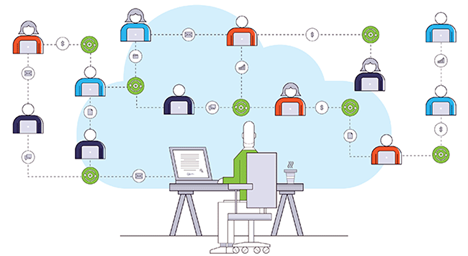
A Business Workflow Management System is a software solution that allows businesses to create, automate and manage recurring business processes (i.e., those that happen regularly). The system identifies who does what, when they do it, and how they get from one step to another.
To explain how workflows work, think of a typical assembly line, except instead of making goods and putting them together one by one, as you would in a factory, there are multiple stages to complete an assigned task. Examples include approvals, requests, reviews, etc. There should be a predetermined way for each person to do each task; they should all be visible, and they all need to be documented so that nothing gets missed.
For example, instead of an employee emailing his/her manager for leave request approval, an employee’s request would follow a structured workflow so that the request is sent to the correct person, tracked through the system, so that they know where it is in the process and when their approval is required.
Why Email & Spreadsheets Fail as Workflow Tools
Businesses often use email and Excel spreadsheets to present daily work activities, but this creates an inefficient process that can be easily disrupted.
Email can be disrupted by:
Emails are getting buried in an inbox
The recipient forgot to reply to the email
Lack of a central place for tracking items that were sent in an email
– Forgotten emails that require approval
Excel spreadsheets can be disrupted by:
Multiple people are editing a file at the same time and creating version conflicts
No real-time status updates available in the spreadsheet
Lack of automated reminders/escalation procedures in the spreadsheet
No accountability for someone delaying a project because of working on the same file
A business workflow management system would eliminate these issues because all activities would be tracked in one location.
How Workflow Management Systems Work (Simple Flow Explanation)
The process for completing a task typically has this straightforward flow:
Submit Request to Management > Manager Reviews & Approves/Disapproves > Team Executes Approved Task > Log Completed Task and Close Out Request
In other words:
- Employee submits a request via the system (e.g., expense reimbursement, vacation request, time off).
- Manager receives & reviews the request from the system.
- The manager either approves or disapproves the request via the system.
- If approved, the next team will execute the task requested, as entered into the system.
- Upon completion of the task requested, the system logs the task as completed and closes the request.
This predictable workflow process transforms chaos into order and brings clarity.
Real Examples
Example 1 — Employee Onboarding
When an employee starts their employment, all employees will be involved with the process: Human Resources, IT, Finance and Administration. When there is no workflow to manage onboarding, the process cannot be managed effectively, resulting in a chaotic, slow onboarding process.
With a Business Workflow Management System, when an employee starts the onboarding process;
- HR Initiates the Workflow for the New Employee Onboarding Process
- IT is Automatically Assigned a Task to create a new employee’s laptop and Email Account
- Finance is Notified of the Need for Payroll Information for the New Employee
- Administration Will Arrange for the New Employee’s Access Card
- The System Tracks the Status of Each Task Until the Employee Has Completed the Employee Onboarding Process.
The Result is a Faster Onboarding Process, No Confusion, and the New Employee’s First Day is Smooth and Enjoyable.
Example 2 — Invoice Approval
Invoices remain in limbo and can become “stuck” when there is no one person to authorise them.
The workflow system solves these problems by providing the following:
- The finance team uploads invoices into the system.
- The system determines which manager the invoice should go to.
- If the approval is not completed within a specified time, the system will remind the manager.
- Once the invoice has been approved, it can then be paid.
The workflow system leads to quicker payments, fewer disputes with vendors, and improved vendor relations.
Example 3 — Purchase Request Workflow
If an employee has requested a new laptop:
- The employee sends in an email request through the system.
- The manager receives the email request and approves it.
- The procurement department is notified of the task.
- The procurement department orders and sends out the laptop.
The entire process is tracked so that no request is lost.
Example 4 — Contract Approval
Typically, contracts will route through legal, finance, and management departments for final approval.
With a business workflow management system, the following will occur:
- Upload Contract
- Legal Review First
- Finance Review Budget
- Leadership Approve Final
This allows for a streamlined process resulting in reduced delays in completing deals.
Key Features to Look For
features that are found within a strong business workflow management system include:
- Workflow Builder with Drag and Drop Access
- Role-based Access Control
- Automation of Notifications when a Workflow Changes
- Real-tim Dashboard
- Audit Trail and Reporting Capabilities
- Integration to Email, ERP and CRM.
Used together, they allow an organization to scale up, as well as providing ease of use.
How Snoh Flow Supports Business Workflow Management
Through intelligent automation, Snoh Flow streamlines business workflows to make it easier to set up custom workflows for your business. You can easily assign responsibilities automatically and track real-time progress on those workflows.
When implemented, Snoh Flow gives businesses the ability to:
- Decrease manual input
- Increase compliance
- Increase accountability
- Increase operational effectiveness
- Decrease approval times
Ultimately, it provides all of the structure, speed, and information necessary for a company’s day-to-day operations by acting as a central nervous system for companies’ business processes.
Conclusion
A business workflow management system has become essential for today’s companies; it provides structure in response to chaos; organization versus disorder; and lower time to completion without compromising quality. Workflow automation is also helping to transform how companies onboard new employees, finance their operations, acquire goods or services, and execute legal agreements.
By implementing a workflow management system, organizations can achieve improved performance, increased speed of delivery and higher quality outputs.
FAQs
What is a business workflow management system?
Automating and managing business process through a structured workflow with one software solution.
Why are emails bad for workflows?
The disappearance of unstructured data (due to lack of tracking) makes it impossible for organizations to get any value from them.
Can small businesses use workflow systems?
Automation is also a huge benefit because it decreases manual work and increases productivity.
Is coding required to use workflow software?
The majority of today’s systems are no-code or low-code – even Snoh Flow.
Can workflow systems integrate with existing tools?
All systems will integrate with operational platforms (ERP, CRM, Email, Cloud).